
Personal Access Tokens for Agents
This guide explains how to create and use a personal access token so tools such as Claude Code can call Claras as you.
Connected agents must be on for your practice before Settings → Connected agents appears. Cloud products such as Claude.ai and ChatGPT sign in instead, so they do not need a token.
A token lets the tool read your client information as it is stored, including full meeting transcripts and client records. Claras redaction does not apply to it. See Client information and privacy before you create one.
Overview
A personal access token is a secret string Claras shows once when you create it. Headless tools and local agents send it as a bearer credential. The token acts as you, with your permissions, for your home practice.
Create a token
Open Settings → Connected agents.
Choose Create token.
Give the token a name that says where it will live, for example “Claude Code laptop”.
Choose how long it stays valid under Expires in. The shortest expiry that suits the job is the safest.
Choose Create token.
Choose Copy token and paste it straight into your password manager or the tool’s secret store. Claras never shows the full value again.
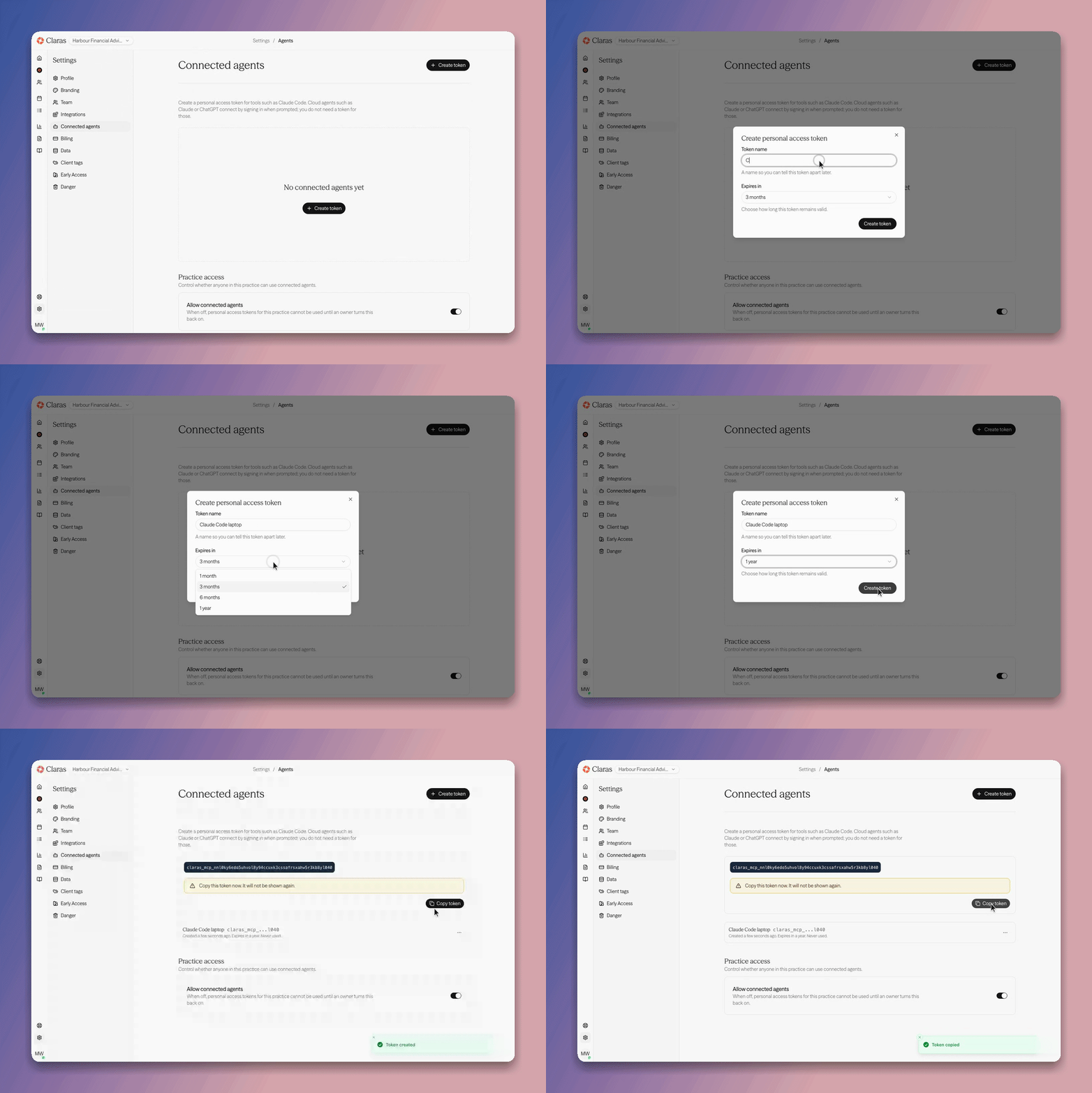
Treat the token like a password. Anyone who has it can act as you in Claras until it expires or you revoke it.
Configure a local agent
Exact config files differ by product. In general you point the tool at Claras and supply the token as the bearer credential.
Server URL:
https://claras.ai/api/mcp/mcpAuthentication: bearer token / personal access token (the value that starts with
claras_mcp_).
For Claude Code and similar local MCP clients, add Claras as a remote server with that URL and header. Prefer environment variables or the tool’s secret mechanism over committing the token to a repo.
Revoke or rotate
Open Settings → Connected agents.
Find the token in the list. Each one shows when it was created, when it expires, and when it was last used.
Open the menu next to it and choose Revoke if the device is lost, the person left the practice, or you suspect exposure.
Create a new token and update the tool configuration.
If something goes wrong
401 or unauthorised: token revoked, expired, or mistyped. Create a new one.
Connected agents disabled: an owner has turned Allow connected agents off for the practice. Contact support to turn it back on.
Token only shown once: if you lost it, revoke and create another. Claras never re-displays the full secret.
Related
Last updated 30th July 2026 by Tsogt