
Billing
Billing shows the file notes and documents generated this cycle, and it is where you change plan, payment details, and cancellation.
You need full access to Settings to open Settings → Billing. The account owner and practice managers have that access.
On Unlimited and on Pay as you go, the plan says how many file notes you have created and how many documents you have generated during the current billing cycle. On Unlimited it also names the renewal date. On Pay as you go it names the day the cycle starts and the day it ends.
Pay as you go
Pay as you go includes 4 file notes each cycle and 4 documents each cycle. The two allowances are separate. After that, each extra file note is $10 ex GST and each extra document is $10 ex GST.
The $50 base is billed at the start of the cycle, and it covers the included file notes and documents. Usage past those amounts is billed at the end of the cycle. The base and the extra usage are both ex GST.
A document counts once, the first time Claras writes it. Regenerating that document is free. If Claras has written part of the document and the generation then stops or fails, that first write still counts, and writing it again does not. A document created before this billing change is not billed, including when you regenerate it.
If the cycle starts on 1 January and you generate 6 file notes and 5 documents in January, the invoice on 1 January is $50. On 1 February it is $50 for the new cycle, plus $20 for the 2 file notes over the 4 included, plus $10 for the 1 document over the 4 included.
Unlimited
Unlimited does not meter documents. Generating a document does not add a charge. The count is still shown on the plan. File notes do not add a charge either.
Unlimited is charged per billable seat. When you add a billable team member, you are billed the prorated amount for the rest of the current cycle immediately. Archiving a team member applies a prorated credit to the next invoice. Changing someone's role is the same kind of change.
Claras shows the charge before you confirm. That covers starting a plan, switching plan, changing from monthly to annual, adding a billable team member, and changing a role. A practice manager is not a billable seat.
A discount stays for the whole offer period, including when you add someone. The preview tells you when a discount is still applied.
Annual billing on Unlimited saves 15%.
Changing plan
On Settings → Billing, open Actions. Claras shows the invoice first. Nothing is billed until you confirm.
Change to Pay as you go or Change to Unlimited happens immediately. Confirm with Change plan. A change between the two plans starts a new billing cycle. If the new plan costs more, you are billed the difference immediately. If it costs less, the difference is a credit against later invoices. A discount on the old plan does not apply to the new plan or the new cycle.
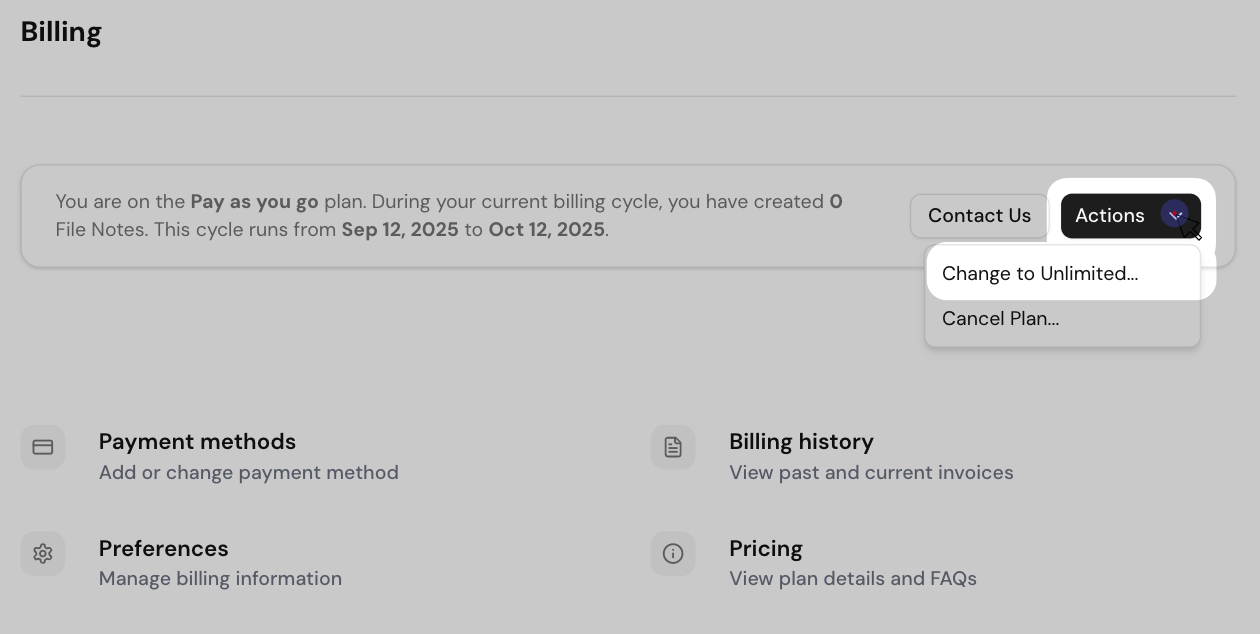
Switch to Annual billing is on monthly Unlimited, and it also happens immediately. Changing the interval keeps the current billing cycle. You preview the invoice, then confirm with Switch.
An annual subscriber switches the other way with Switch to monthly billing. That change does not happen immediately. The plan stays on annual billing until the end of the current period, and monthly billing starts then. The dialog names that date and shows the monthly invoice. Confirm with Switch to monthly. A discount on the annual plan does not carry over to monthly billing.
Billing then says the plan switches to monthly billing on that date. Actions offers Keep annual billing, which drops the scheduled change. While the change is scheduled, the plan cannot be switched to Pay as you go. Cancel Plan is still there.
Invoices and payment
Each payment emails you a tax invoice and a receipt.
Billing history opens the Stripe customer portal, where you download a copy. Preferences is where you change the email that receives those receipts and invoices. If an invoice is not a tax invoice, add your ABN there as a "Tax ID" and save. Later invoices are tax invoices. Payment methods opens the portal so you can change the card.
Cancellation
Cancel Plan ends the subscription at the close of the current cycle. You keep access until then. Billing says the plan is set to finish on that date.
Renew plan reverses the cancellation before that date. After the date, you start a new subscription.
You can still add a team member while the plan is set to cancel. You are billed immediately for the time left.
On Pay as you go, the base for the current month is already paid, and the next month is not charged. File notes and documents past the included amounts for that last cycle are billed when the plan cancels.
Last updated 6th November 2026 by Connor